

Websites, Google Ads and Google Analytics provide data, but each tool operates independently. We’ll show you the different ways to link them together: from Google Ads scripts and workflow tools to MCP servers and AI agents. We’ll also share practical insights and a checklist covering hosting, rights and data protection.
Website, Google Ads and Analytics: three tools, no connection
In most WordPress projects, day-to-day operations follow the same pattern. The website is hosted on a server, campaigns run on Google Ads, and analytics are tracked in Google Analytics 4 (GA4). On top of that, there’s Google Search Console and a CRM system where enquiries are logged.
Each of these tools answers a specific question:
- Google Ads knows how many clicks you’ve purchased.
- GA4 knows how many sessions are generated on the website.
- Search Console knows which search terms people use to find you organically.
- The CRM system knows which enquiries will ultimately turn into customers.
None of them alone answers the really important question: does the money you spend on adverts generate usable enquiries? To find that out, you need to compare the figures side by side. In most cases, this means: four browser tabs, an export to Excel and an hour spent cross-checking. That hour is regularly missing from an agency’s day-to-day work, and errors go undetected for weeks.
The good news is that all these tools have interfaces. The only question is how to connect them.
API, orchestration, agent, MCP: a brief explanation of the terms
Four terms quickly come up in the discussion. They refer to different levels:
- API: An API (application programming interface) is the gateway through which one programme exchanges data with another. WordPress has the REST API, whilst Google offers the Google Ads API, the Google Analytics Data API and the Search Console API.
- API orchestration: Orchestration involves chaining together several API calls to form a fixed sequence – for example, ‘retrieve costs from Google Ads every Monday, match them with leads from the CRM, and send a report’. The sequence is defined in advance.
- AI agent: An agent is a language model that decides for itself which tools to use and in what order to solve a task. Instead of a fixed sequence of steps, you simply specify a goal: “Check why the campaign isn’t reporting any conversions.”
- MCP: The Model Context Protocol is an open standard that enables AI assistants and agents to communicate with external systems. An MCP server informs the AI of the available tools (such as ‘retrieve campaign figures’) and executes them. The AI does not need to be aware of the underlying API.
In short: APIs form the basis; orchestration links them together according to a fixed plan; an agent plans for itself; and MCP acts as the link between the agent and the API.
Four ways to connect WordPress to Google Ads and GA4
Which approach is right for you depends on how much flexibility you need and how much control you want to retain.
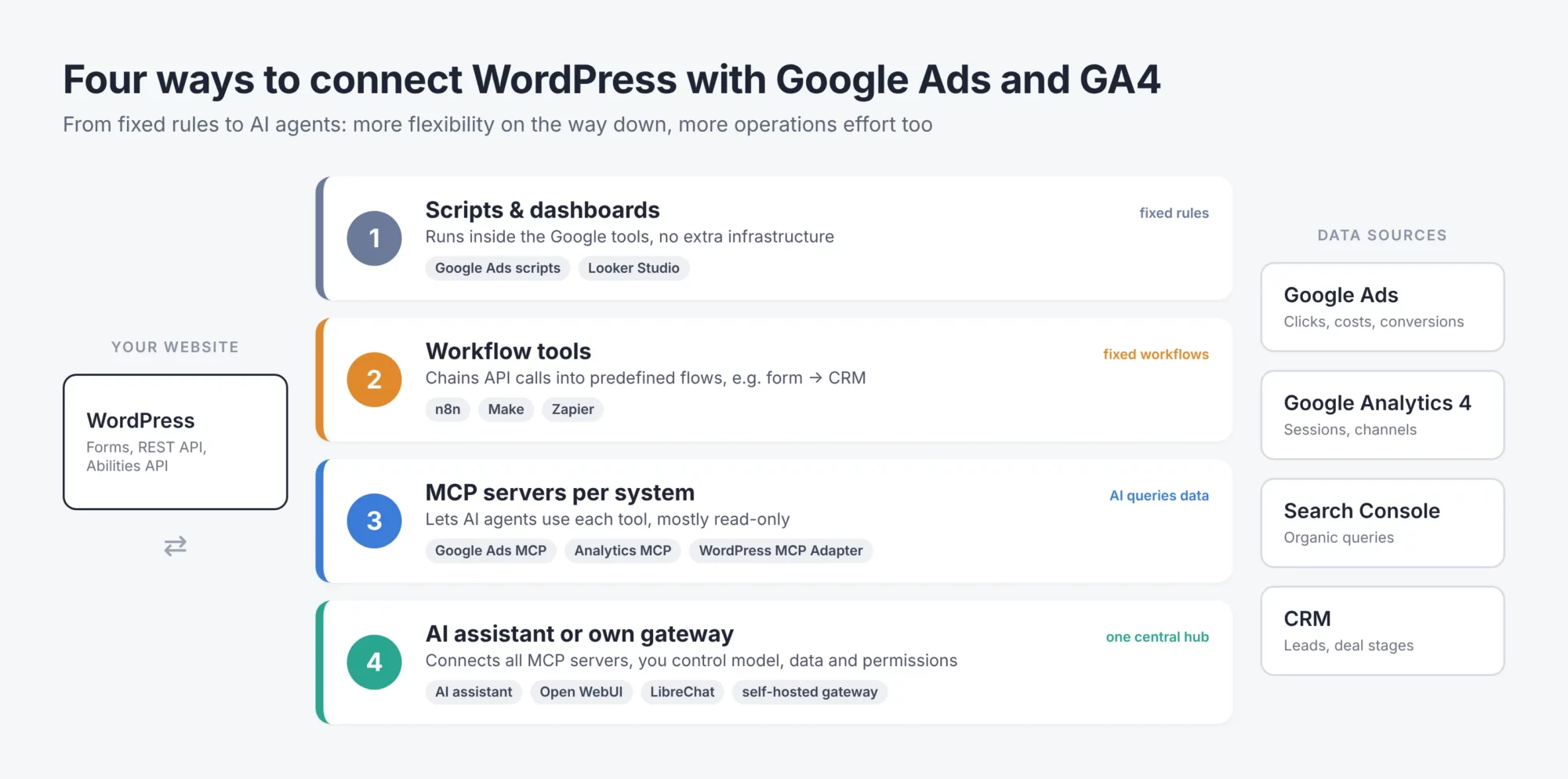
Figure 1: Four ways to connect WordPress to Google Ads and GA4. Source: OIT GmbH
1. Scripts and reports directly within Google tools
Google Ads scripts are JavaScript programmes that you write in your Google Ads account and run on a scheduled basis – hourly, daily or weekly. Typical tasks include: budget alerts, generating reports in a Google Sheet, and pausing high-cost keywords. Dashboards such as Looker Studio are suitable for analysing data from multiple sources. This approach requires no additional infrastructure, but is limited to pre-programmed rules.
2. Workflow tools for standardised processes
Tools such as n8n, Make or Zapier connect APIs using a modular approach. A form in WordPress triggers a workflow that adds the lead to the CRM and saves the click ID. n8n can be self-hosted, which helps with data protection. The two worlds are now converging: n8n can deploy workflows as an MCP server and, using an MCP client node, can itself utilise external MCP servers. Zapier MCP makes thousands of app actions available to AI assistants; there, each tool call costs two tasks from your quota.
3. MCP servers for individual systems
There are now dedicated MCP servers for the most important systems:
- Google Ads: Google has documented an official Google Ads MCP server. It is currently read-only and offers, amongst other things, GAQL (Google Ads Query Language) queries on campaigns, budgets and metrics.
- Google Analytics: The Google Analytics MCP Server uses the Admin API and the Data API with read-only access and is marked as experimental.
- WordPress: The Abilities API was introduced with WordPress 6.9. The official MCP adapter makes registered abilities available to AI agents as tools – either locally via WP-CLI or via HTTP using application passwords.
In addition, there are numerous community servers. When using these, check carefully who maintains them and what permissions they require.
4. AI assistant or your own gateway as a control centre
The MCP servers require a ‘client’ to use them. This could be an AI assistant such as Claude or ChatGPT, which connects to several MCP servers. Alternatively, you can run your own AI gateway: a central hub on your server through which all AI requests pass and to which the connections to the tools are linked. There are open-source interfaces available for this, such as Open WebUI or LibreChat. The advantage of a gateway is that you decide for yourself which language model is used, what data it has access to, and who is permitted to use which tools. The disadvantage is that you have to run and maintain it.
We use this fourth approach ourselves, combining WordPress, Google Ads, GA4, Search Console and our CRM. The following findings are based on this setup – but they can be replicated using any of approaches 2 to 4.
| Path | Strength | Border | Suitable for |
| Google Ads scripts, dashboards | No additional infrastructure required; runs via your Google Account | Only pre-programmed rules; one source per script | Budget alerts, standard reports |
| Workflow tools (n8n, Make, Zapier) | Fixed workflows across multiple systems, some of which can be self-hosted | Every special case requires its own workflow | Lead handover, regular reports |
| MCP servers per system | AI retrieves data freely; official servers for Google Ads and GA4 | Mostly just reading; level of care varies greatly | Ad hoc analyses, troubleshooting |
| AI assistant or your own gateway | All sources in one place; rights and the model itself can be managed independently | Operation, maintenance and data protection audit required | Agencies with numerous accounts, recurring audits |
How AI-powered analysis is used in practice
The added value only becomes apparent when the AI analyses several sources simultaneously. These four findings come from our own accounts.
1. ‘0 conversions’ – and yet a genuine enquiry
A campaign in Google Ads reported zero conversions for weeks. The obvious conclusion would have been to pause it. However, a cross-check with the CRM revealed a qualified enquiry that was verifiably generated by an ad click – Google’s click ID (gclid) was included in the data record. The person had not given their consent in the cookie banner, which is why GA4 and Google Ads did not recognise them.
The solution: The form passes the gclid to the CRM. If an enquiry reaches a qualified stage, it is sent back to Google as an offline conversion – containing only the click ID, timestamp and value. For new integrations, Google uses the Data Manager API for this purpose. ‘0 conversions’ never means ‘no enquiries’ until someone has checked the CRM.
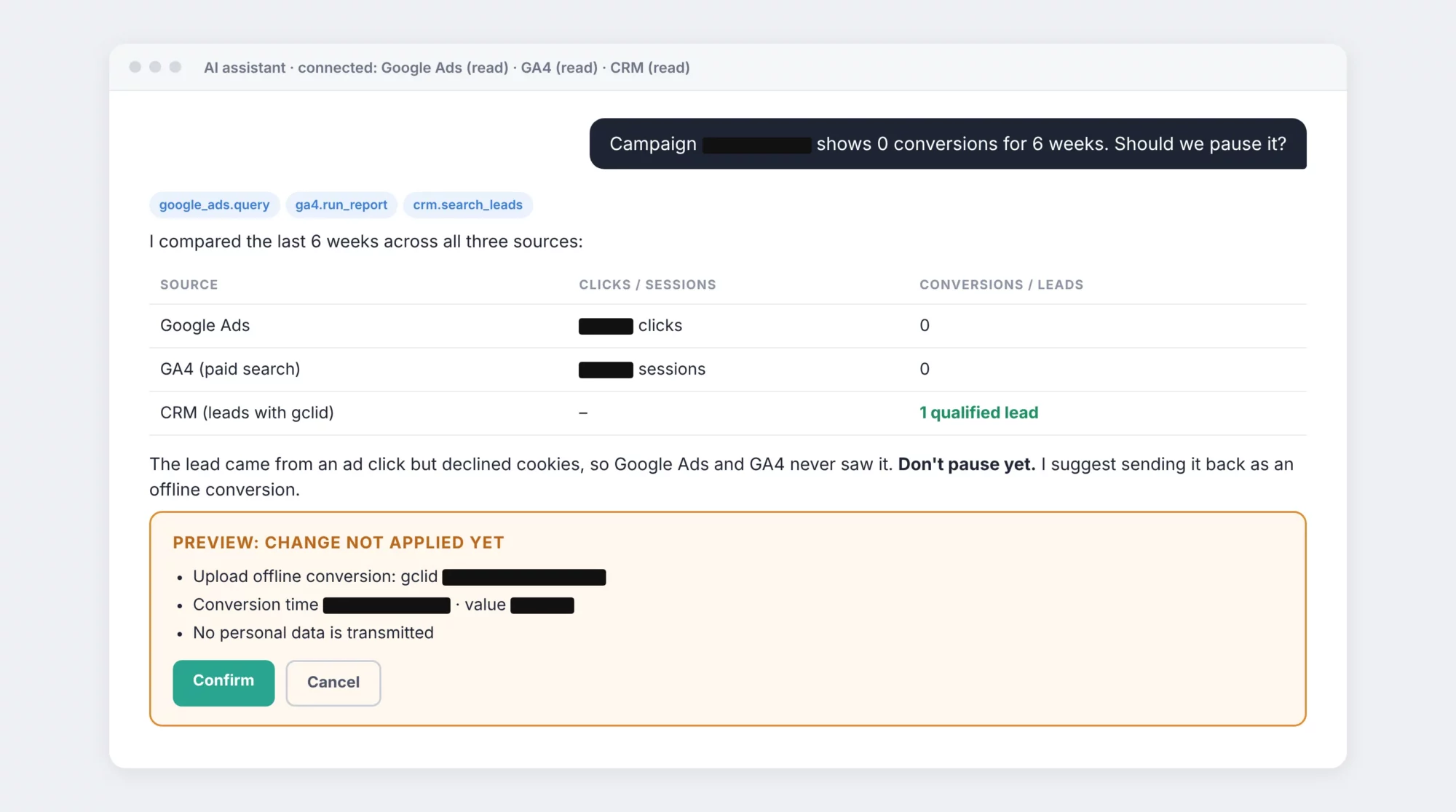
Figure 2: AI reconciliation of Google Ads, GA4 and CRM with a preview and confirmation step; values have been redacted. Source: OIT GmbH
2. Google itself has tweaked the settings
Google Ads can automatically apply recommendations (‘Auto-Apply’). An API query of all subscriptions revealed that almost all of them were active. These included the switch to broad match keywords and the expansion into the Display Network, which we had deliberately disabled. The API change history confirmed the intervention. Important: Pausing campaigns does not undo previous changes. Always check the actual settings afterwards.
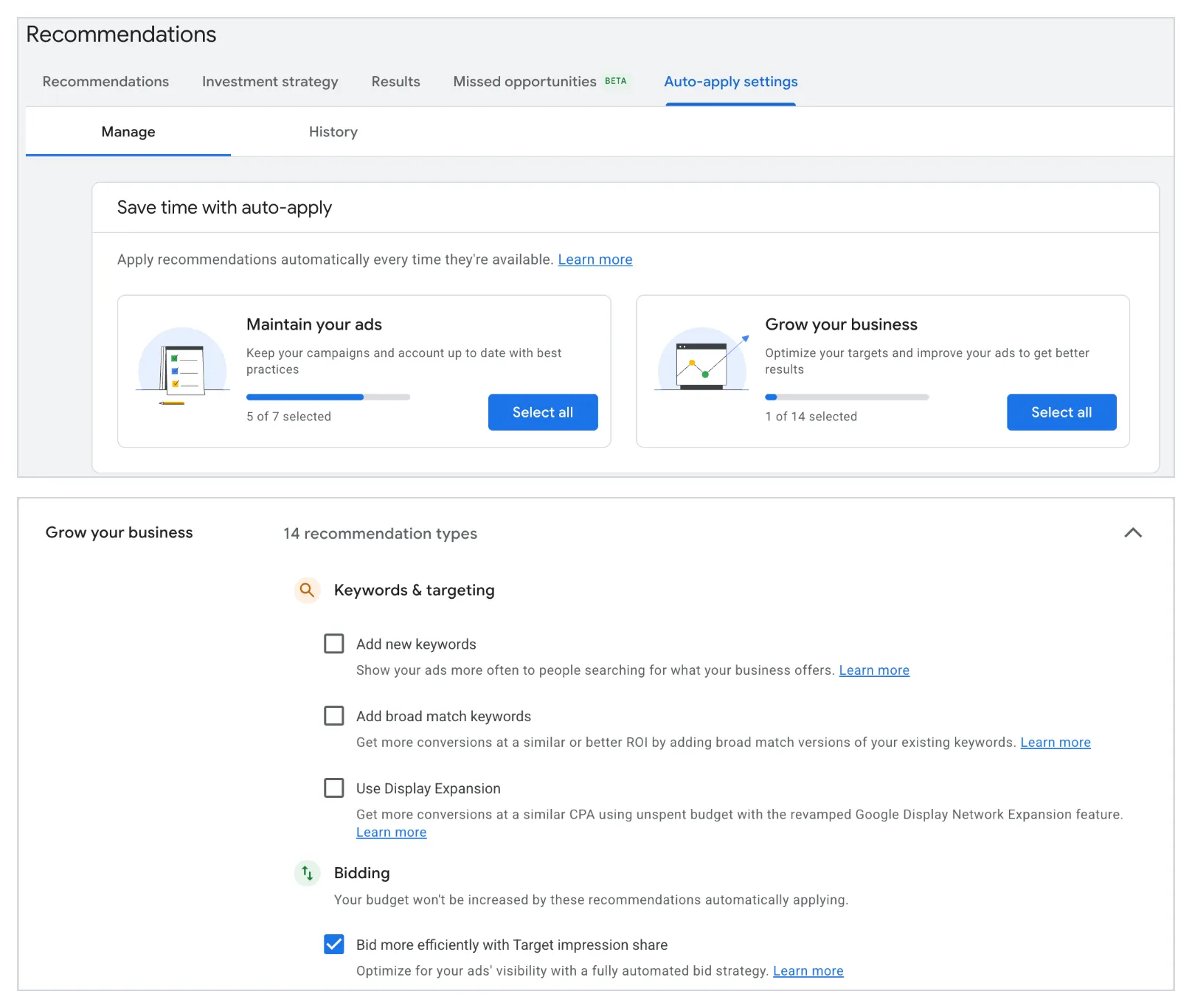
Figure 3: Auto-apply settings in Google Ads following the pausing of subscriptions that alter keywords and networks. Source: Google Ads screenshot, OIT GmbH
3. Ad clicks without visitors – due to the cache
Over a three-day period, Google Ads reported clicks, but GA4 did not record any paid sessions. Comparing the landing page with and without the click ID appended revealed the cause: for URLs containing parameters (gclid, fbclid, utm_*), the cache plugin’s CSS optimisation removed the cookie banner’s stylesheet. On smartphones, the ‘Accept all’ button was outside the visible area. Without consent, no tracking takes place. You can find out more about setting this up correctly in the articles on Google Consent Mode v2 and Borlabs Cookie.
4. Content suggestions based on real user data
Of seven enquiries received via a trial access page, six ended up in the archive – almost all of them from private individuals looking for something free. The reason lay in the text: the word ‘free’ appeared in nine places. The new wording states the price and requires the company name as a mandatory field. At the same time, Search Console showed that industry-specific pages generate organic enquiries from businesses – a clear indication of which content is worthwhile.
None of these findings requires any special software. All that is needed is someone – or something – to regularly compare the sources side by side.
What to look out for when making your choice
Whichever route you choose, there are a few things you should sort out beforehand.
Permissions: read – yes; write – only with authorisation
- Set up separate accounts for the AI: a WordPress user with minimal permissions and an application password, and a separate Google Cloud project with OAuth.
- Start by reading only. The official MCP servers for Google Ads and GA4 are read-only anyway – which is an advantage when you’re just starting out.
- Writing tasks (budgets, campaign status, posts) should be carried out in two stages: the AI displays a preview with an explanation, a human confirms it, after which the AI updates the status and logs the change.
Hosting: Keeping an eye on load and cache
- Agents access the system via the REST API and bypass the page cache. Your hosting provider should be able to handle this load without any delays; an object cache such as Redis helps with this.
- Every click on an advert has its own click ID. If the cache key contains this ID, every click results in a cache miss – WordPress regenerates the page each time.
- Always test CSS and JavaScript optimisations using a real click URL and check that the cookie banner remains usable on a smartphone.
Data protection: Sharing data sparingly
- Respect consent: Use Google Consent Mode v2 to ensure that Google tags only set cookies once consent has been given.
- Aggregated data for the AI: Metrics such as clicks, sessions and costs are sufficient for analysis. The AI does not require personal data for this purpose.
- Minimum data: For offline conversions, you only need to provide the click ID, timestamp and value.
- Control over the data path: For each data path, establish where the data is processed – whether by the workflow provider, the AI provider or on your own server – and record this in the register of processing activities.
Conclusion: Start small, bring sources together
There isn’t just one right way. Scripts and dashboards handle standard tasks, workflow tools automate fixed processes, MCP servers make your data accessible to AI agents, and an assistant or gateway brings everything together in one place.
Our key findings:
- Check the figures against the CRM. ‘0 conversions’ may be a measurement gap, not a failure.
- Check your settings rather than guessing what they are. Automatic recommendations can change campaigns without warning.
- Test using real click URLs. Caching and optimisations behave differently with URLs containing parameters.
- Measure enquiries, not clicks. A single word on the landing page can attract the wrong target audience.
- Let the AI read the text and let people make the decision. Writing actions require approval and a record.
Start small: first, connect GA4 and Search Console in ‘read-only’ mode using an AI assistant and have it generate a weekly report for you. Once you’re confident in the results, you can add Google Ads, your CRM and your first automations.


Leave a Reply